Algebra Worksheets Generator
Make printable algebra 1 practice sheets in seconds: pick the problem types, the difficulty and how many problems, then print the worksheet with its answer key.
Recent
Your last 10 settings, saved only in this browser. Nothing is uploaded.
Popular tools
- Order of Operations Worksheet GeneratorMake printable PEMDAS practice – from easy two-step problems to brackets, exponents and fractions – with an answer key on its own page.
- Pythagorean Theorem Worksheet GeneratorMake printable Pythagorean theorem practice with right triangles drawn to scale, exact and rounded answers, and a full answer key.
- Rational Expression Worksheets GeneratorMake printable practice on rational expressions – simplify, multiply, divide, add and subtract, then solve rational equations – with answers in factored form.
The Algebra Worksheet Generator makes printable algebra worksheets, with an answer key, right in your web browser. It is free, needs no sign-up, and nothing is uploaded, because the problems are made on your own device.
You choose from a range of problem types, including two-step equations, inequalities, slope, combining like terms, factoring and simplifying square roots. Each sheet can be set to Easy, Medium or Hard, with anywhere from 6 to 30 problems. This page offers 16 algebra 1 problem types for mixed review sheets; each topic also has its own generator page with more problem types, listed at the end of this guide. The Easy level works as beginning algebra worksheets, and the answer key turns each sheet into simple algebra questions with answers. Everything you make here is free to use in class or in products you sell, such as Teachers Pay Teachers resources, Etsy printables or KDP workbooks.
How to use the Algebra Worksheet Generator
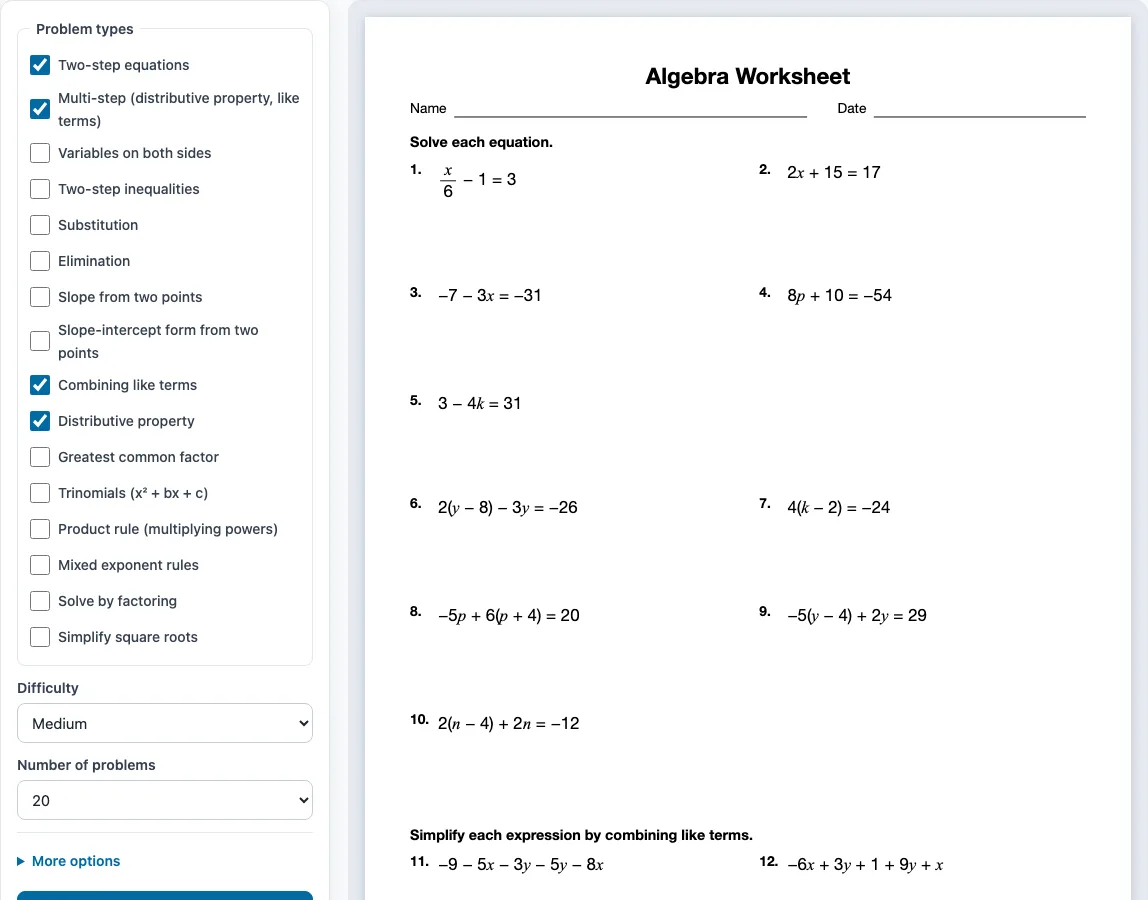
- Tick one or more boxes under Problem types. Ticking one type gives a focused practice sheet. Ticking several gives a review sheet, with the problems shared evenly between the types and grouped under their own instructions.
- Choose a Difficulty: Easy, Medium or Hard.
- Choose the Number of problems: 6, 8, 10, 12, 15, 20, 24 or 30.
- Open More options if you want to change the Columns (Automatic, 1, 2 or 3), the Paper size (Letter or A4), the Worksheet title, or the Name and date line. The Answer key on a separate page box is on by default.
- Check the preview on the right. It shows the sheet as it will print.
- Click Show answers to see the answers under each problem in the preview. Click it again to hide them.
- Click New worksheet for a fresh set of problems with the same settings.
- Click Print / Save as PDF. In the browser’s print dialog, choose Save as PDF if you want a file instead of a paper copy.
Click Copy link to copy a link that opens exactly the same worksheet again. The settings are remembered in your browser for your next visit, unless you open a shared link, which uses that link’s settings. The tool also works on phones and tablets, though printing needs a printer or the Save as PDF option.
What is on an algebra 1 worksheet?
An algebra 1 worksheet usually covers combining like terms and the distributive property, solving linear equations, solving inequalities, slope, exponent rules, factoring and simplifying square roots. Most problems ask you to simplify an expression or find the value of an unknown.
The main idea behind solving equations is to undo each operation, in reverse order, until the variable is alone. For example, take 15 - 9x = 69. Subtract 15 from both sides to get -9x = 54. Then divide both sides by -9 to get x = -6. You can check by putting -6 back in: 15 - 9(-6) = 15 + 54 = 69.
Equations with brackets use the distributive property first. For 2(x + 3) = 22, multiply the 2 by each term inside the bracket to get 2x + 6 = 22. Subtract 6 to get 2x = 16, then divide by 2 to get x = 8.
Combining like terms means adding or subtracting terms with the same variable part. In 8x - 6 + 8 + 5x, the x terms add to 13x and the numbers add to 2, so the answer is 13x + 2.
Inequalities are solved the same way as equations, with one rule to watch. If you multiply or divide both sides by a negative number, you must flip the inequality sign. For example, -9 - 6x ≤ -45 becomes -6x ≤ -36 after adding 9 to both sides. Dividing by -6 gives x ≥ 6.
Are there easy algebra worksheets for beginners?
Yes. Set Difficulty to Easy and tick one type at a time, such as Combining like terms or Two-step equations. This lets a beginner practise one skill before mixing several together.
Easy two-step equations use only one operation at each stage. For example, x/3 + 4 = 5 becomes x/3 = 1 after subtracting 4, and then x = 3 after multiplying both sides by 3. Working through a few of these with the answers shown helps you see the pattern before you try problems on your own.
Sample problems from this generator
- m8 + 6 = 10 Answer: m = 32
- −5x − 11 + 3x = −9 Answer: x = −1
- 8x + 4y − 9y − 4x − 5 Answer: 4x − 5y − 5
- −2(3x − 2) Answer: −6x + 4
Frequently asked questions
Are there answers on the worksheet?
Yes. The answer key is on by default and starts on a new page after the worksheet when you print. It lists every problem number with its answer. To see answers on screen first, click Show answers.
Is the algebra worksheet generator free, and can I print it as a PDF?
Yes. It is free and needs no sign-up. Click Print / Save as PDF, then choose Save as PDF in the browser’s print dialog to get a PDF file. You can also print directly if you have a printer, and you can choose Letter or A4 paper size.
How do I make a different worksheet each time?
Click New worksheet. It makes a fresh random set of problems with the same settings, and no problem repeats on one sheet. A teacher can print several versions this way, for example one for each row of desks.
Are these year 7 algebra worksheets?
The tool does not follow a particular school year’s curriculum, so choose your problem types to match what your class is studying. For early work, the Easy level with Combining like terms or Two-step equations is a good starting point.
Can I use the generator on a phone or tablet?
Yes. It works on phones and tablets as well as computers. Printing still needs a printer, or you can use the Save as PDF option.
Can I sell the algebra worksheets I make here on Teachers Pay Teachers?
Yes. Everything you make here is royalty-free for personal, classroom and commercial use, including Teachers Pay Teachers, Etsy printables, KDP workbooks and print-on-demand products. No credit is required. The only thing you may not do is copy the generator or the site itself to run a competing service. See the terms.
Related tools
- Solving equations worksheets: Use when you want more practice on equations beyond the basic two-step and multi-step types.
- Pre-algebra worksheets: Use before algebra if you need to build up the arithmetic and number skills first.
- Slope worksheets: Use when you are practising finding slope and writing equations of lines.
- Systems of equations worksheets: Use when you are solving two equations together by substitution or elimination.
- Factoring worksheets: Use when you are practising greatest common factor and factoring trinomials.
- Quadratic equations worksheets: Use when you are solving quadratic equations by factoring.
- Exponents worksheets: Use when you want focused practice on the product rule and other exponent rules.
- Inequalities worksheets: Use when you need more practice solving and graphing inequalities.
- Simplifying radicals worksheets: Use when you are practising simplifying square roots.
- Algebra 2 worksheets: Use when you move on to the quadratic formula, rational expressions and functions.
- Functions worksheets: Use when you practise function notation and linear function word problems.
- Equation word problems worksheets: Use when you want students to write equations from situations.
- Distributive property worksheets: expanding and combining like terms.
- Literal equations worksheets: solving formulas for a variable.
- Graphing linear equations worksheets: graphing lines on blank grids.