Arithmetic Sequence Worksheet Generator
Make printable arithmetic and geometric sequences practice – common differences, explicit and recursive formulas, missing terms and series sums – with an answer key.
Recent
Your last 10 settings, saved only in this browser. Nothing is uploaded.
This free arithmetic sequence worksheet generator creates printable practice sheets with answer keys. It covers next terms, common differences, explicit and recursive formulas, nth terms, arithmetic series sums, and geometric sequences. It runs in your web browser with no sign-up, and nothing you make is uploaded because the problems are generated on your own device.
You choose the problem types, difficulty, and number of problems, then print the sheet or save it as a PDF. Students can use it for homework, revision, or extra practice before a test. Teachers can make several versions of the same sheet and use them in class or in products they sell, such as Teachers Pay Teachers resources, and the controls let you set up an arithmetic sequence worksheet with answers PDF or a mixed arithmetic and geometric sequences worksheet in a few clicks.
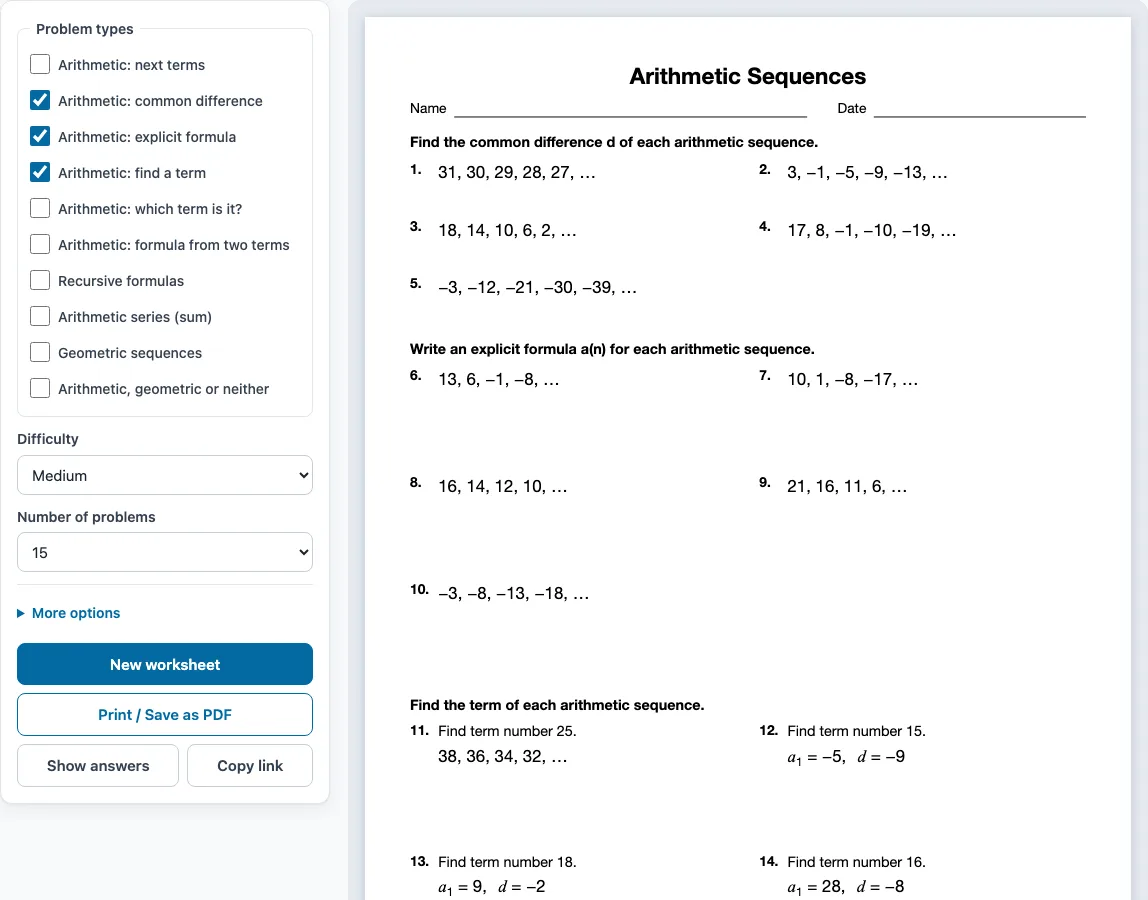
How to use the arithmetic sequence worksheet generator
- Tick one or more boxes under Problem types. Three are ticked when the page opens: Arithmetic: common difference, Arithmetic: explicit formula, and Arithmetic: find a term. When you tick several types, the problems are shared evenly between them and grouped by type, each group with its own instruction.
- Choose a Difficulty: Easy, Medium, or Hard.
- Pick the Number of problems: 6, 8, 10, 12, 15, 20, 24, or 30.
- Open More options to set the Columns (Automatic, 1, 2, or 3), the Paper size (Letter 8.5 × 11 in or A4 210 × 297 mm), a Worksheet title, and the Name and date line checkbox.
- Check the preview on the right, which shows the sheet as it will print. Press Show answers to see each answer under its problem, and press it again to hide them.
- Click Print / Save as PDF. In the browser’s print dialog, choose Save as PDF to get a file. The answer key starts on a new page after the worksheet. It is on by default, and you can switch it off under More options.
- Click New worksheet for a fresh random set with the same settings.
Click Copy link to share the exact same worksheet. The link stores the problem set as a number, so anyone who opens it gets the same problems. Your settings are remembered in this browser for your next visit, but a shared link uses its own settings. The tool also works on phones and tablets. Printing needs a printer or the Save as PDF option.
What is an arithmetic sequence
An arithmetic sequence is a list of numbers in which each term is found by adding the same fixed number to the term before it. That fixed number is the common difference, written d. You find it by subtracting any term from the term after it: d = a2 − a1.
In 8, 13, 18, 23, … each step adds 5, so d = 5. The difference can also be negative or a decimal. In −1, −9, −17, −25, the sequence drops by 8 each time, so d = −8. In 12, 14.25, 16.5, 18.75, the difference is 2.25.
How do you find the nth term of an arithmetic sequence
Use the formula aₙ = a₁ + (n − 1)d, where a₁ is the first term, d is the common difference, and n is the position of the term you want. Substitute the values, then simplify the result into the form aₙ = dn + constant.
For 14, 17, 20, 23, … the first term is 14 and d = 3, so aₙ = 14 + (n − 1)3, which simplifies to aₙ = 3n + 11. To check it, the 9th term is 3(9) + 11 = 38. The Arithmetic: find a term type asks for one term directly: with a₁ = 8 and d = 5, term number 18 is a₁₈ = 8 + 17 × 5 = 93.
You can also work backwards. To find which term equals a given value, set the formula equal to that value and solve for n. For the sequence 8, 13, 18, …, the explicit formula is 5n + 3, so solving 5n + 3 = 108 gives n = 21. If you know two terms instead, the difference comes from their gap in position. With a₄ = 23 and a₁₀ = 53, d = (53 − 23)/(10 − 4) = 5. Then step back from a₄ to the first term: a₁ = 23 − 3 × 5 = 8, so the formula is aₙ = 5n + 3.
A recursive formula describes the same sequence one step at a time. For 8, 13, 18, …, it is a₁ = 8 and aₙ = aₙ₋₁ + 5. Each term uses the one before it, while the explicit formula jumps straight to any term.
Sample problems from this generator
- 31, 23, 15, 7, −1, … Answer: d = −8
- 30, 23, 16, 9, 2, … Answer: d = −7
- 34, 33, 32, 31, … Answer: an = −n + 35
- Find term number 14. a1 = 23, d = −3 Answer: a14 = −16
Frequently asked questions
How do you find the sum of an arithmetic series?
Use Sₙ = n(a₁ + aₙ)/2, where n is the number of terms. For example, the first 12 terms of 8, 13, 18, … have a₁₂ = 63, so the sum is 12(8 + 63)/2 = 426. The Arithmetic series (sum) problem type gives you practice with this formula.
What is the difference between arithmetic and geometric sequences?
An arithmetic sequence adds the same number d each time, while a geometric sequence multiplies by the same ratio r each time. For example, 3, 6, 12, 24, … has r = 2 and aₙ = 3·2^(n−1). The Arithmetic, geometric or neither problem type asks you to decide which kind a list is, and 1, 4, 9, 16, … is neither.
Can I make an arithmetic and geometric sequences worksheet with answers as a PDF?
Yes. Tick Geometric sequences along with the arithmetic problem types, then click Print / Save as PDF and choose Save as PDF in the print dialog. The answer key is on a separate page by default.
Are the arithmetic sequence worksheets I make here free for commercial use?
Yes. You can sell what you make here, for example as a Teachers Pay Teachers resource, an Etsy download or pages in a KDP book. It is royalty-free and needs no credit line. The only limit is that you may not mirror or resell the site or its generators as a competing service.
Will each worksheet have different problems?
Each click on New worksheet gives a new random set with the same settings. No problem repeats on one sheet. Teachers can print several versions, for example one per row of desks, and students can practise again with new numbers.
Which difficulty should I choose?
Easy uses a positive whole-number difference, Medium uses a negative difference, and Hard uses decimals in quarters such as 1.5 or −0.25. For geometric sequences, Hard also uses ratios such as −2 or 1/2.
Related tools
- Functions worksheets: Use these when you want to connect sequence rules to function notation.
- Graphing linear equations worksheets: Use these to graph lines like y = 5x + 3, the same pattern an arithmetic sequence follows.
- Exponents worksheets: Use these to practise the powers needed for geometric sequences.
- Algebra 2 worksheets: Use these for more advanced series and sequence topics.
- Solving equations worksheets: Use these to strengthen the equation solving used in finding term positions.
- Equation word problems worksheets: Use these to apply sequences to real-world situations.
- Algebra worksheets: Use this page to browse all the algebra worksheet generators.