Domain and Range Worksheet Generator
Make printable domain and range practice – sets of ordered pairs, mapping diagrams, graphs with open and closed endpoints, and functions given by equations – with an answer key.
Recent
Your last 10 settings, saved only in this browser. Nothing is uploaded.
A domain and range worksheet is a printed set of practice problems where you name the inputs (the domain) and outputs (the range) of an ordered-pair list, mapping diagram, graph or equation. This Domain and Range Worksheet Generator makes one for you in your web browser. It is free, and you do not need to sign up. Pick the problem types, difficulty and number of problems, then print the sheet or save it as a PDF.
It suits a domain and range practice worksheet for homework, an algebra 1 domain and range worksheet for class, or a quick domain range worksheet check before a test. Each sheet includes an answer key on a separate page, and everything you make is free to use in class or in products you sell, such as Teachers Pay Teachers resources.
How to use the Domain and Range Worksheet Generator
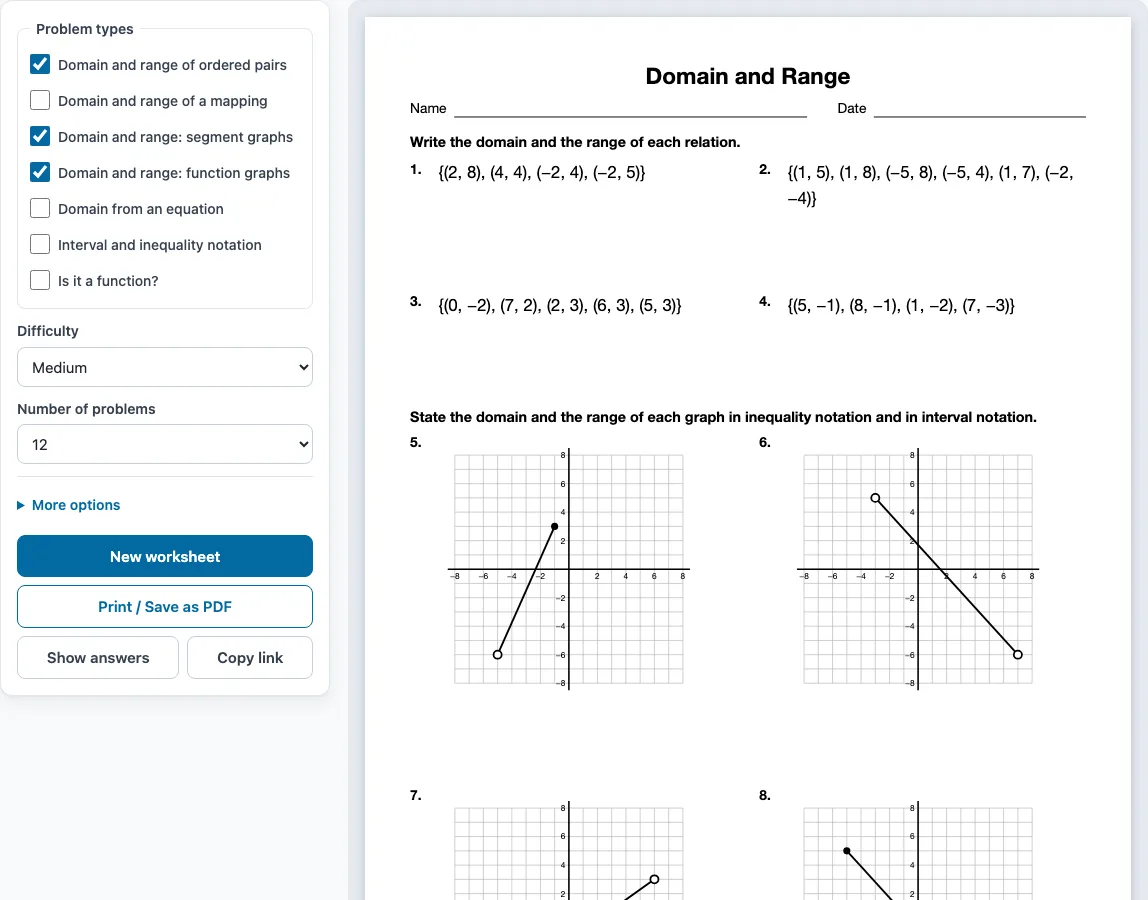
- Tick one or more boxes under Problem types. The problems are shared evenly between the types you choose, and each group gets its own instruction line. Three types are ticked when the page opens: Domain and range of ordered pairs, Domain and range: segment graphs and Domain and range: function graphs.
- Choose a Difficulty: Easy, Medium or Hard.
- Choose the Number of problems: 6, 8, 10, 12, 15, 20, 24 or 30.
- Open More options to adjust the layout:
- Columns: Automatic, 1, 2 or 3.
- Paper size: Letter (8.5 × 11 in) or A4 (210 × 297 mm).
- Worksheet title: type the text you want printed at the top.
- Name and date line: tick to add a line for the student’s name and the date.
- Answer key on a separate page: on by default. Untick it to leave the key off.
- Check the preview on the right. It shows the sheet as it will print.
- Click Show answers to display each answer under its problem in the preview. Click again to hide them.
- Click Print / Save as PDF. In the print dialog, choose Save as PDF to create a PDF file.
Your settings are remembered in this browser for your next visit. If you want the same settings with different problems, click New worksheet. To send a worksheet to someone, click Copy link; the link opens exactly the same sheet. The tool also works on phones and tablets. Printing needs a printer or the Save as PDF option.
What is domain and range?
The domain is the set of all inputs, which are the x-values. The range is the set of all outputs, which are the y-values. Each set is written once per value, in order, usually in set braces.
For a list of ordered pairs, write each x-value once for the domain and each y-value once for the range. For example, in {(2, 7), (4, 6), (7, 7)}, the domain is {2, 4, 7} and the range is {6, 7}. The 7 appears twice as a y-value, but it is listed only once in the range. A mapping diagram works the same way: the numbers on the left are the domain and the numbers on the right that receive arrows are the range.
For an equation, think about which x-values are allowed. Exclude any x-value that makes a denominator zero, so f(x) = 1/(x − 3) has x ≠ 3. Exclude any x-value that puts a negative number under a square root, so f(x) = √(x + 2) has x ≥ −2. A polynomial such as x² − 2 has a domain of all real numbers. The range of f(x) = x² + 1 is y ≥ 1, because the smallest output is 1.
How do you find the domain and range from a graph?
Read the domain from the leftmost x-value to the rightmost x-value, and read the range from the lowest y-value to the highest. Then check each endpoint: a closed dot means the endpoint is included, and an open dot means it is not.
Write the answer as an inequality or in interval notation. A closed dot uses ≤ or a square bracket, and an open dot uses < or a round bracket. For example, [−3, 5) means −3 ≤ x < 5. An arrow means the graph continues forever, so the interval ends with ∞ or −∞. Infinity always takes a round bracket, even though the endpoint is never reached.
Sample problems from this generator
- {(1, 5), (5, 0), (3, 5), (6, 0)} Answer: Domain: {1, 3, 5, 6} Range: {0, 5}
- {(0, −3), (−5, 4), (7, 7), (−6, 7), (−1, −3)} Answer: Domain: {−6, −5, −1, 0, 7} Range: {−3, 4, 7}
-
Answer: Domain: −7 < x ≤ 4or(−7, 4]
Range: −1 < y ≤ 6or(−1, 6] -
Answer: Domain: all real numbersor(−∞, ∞)
Range: all real numbersor(−∞, ∞)
Frequently asked questions
Can I use the domain and range worksheets I make in my tutoring business or my TpT store?
Yes. The worksheets and answer keys you generate are free for personal, classroom and commercial use, such as Teachers Pay Teachers products, Etsy listings or a printed workbook. You do not need to credit this site. You may not copy the generator itself and offer it as your own tool.
How do you tell if a relation is a function?
A relation is a function when no x-value has two different y-values. In {(5, 1), (7, 2), (8, 6), (8, 9)}, the x-value 8 pairs with both 6 and 9, so it is not a function. Tick the Is it a function? problem type to practise this check.
What does the answer key show?
The key appears on a separate page after the worksheet and lists every problem number with its answer. For graph problems it gives the domain and range both as inequalities and in interval notation, for example −4 ≤ x < 2 or [−4, 2). Untick the answer key option if you want a worksheet without one.
Does the generator store my problems or need an account?
No account or sign-up is needed. The generator runs in your browser, nothing is uploaded, and the problems are made on your device. Only your settings are remembered on this browser.
How do I get different problems with the same settings?
Click New worksheet. Each click makes a fresh random set with the same settings, so you can print several versions for different desks or practise again with new numbers. No problem repeats on one sheet.
Related tools
- Functions worksheets: use these after domain and range when you need to evaluate and compare functions.
- Inequalities worksheets: use these to practise the inequality forms behind domain and range answers.
- Graphing linear equations worksheets: use these to practise plotting the graphs you read domain and range from.
- Quadratic equations worksheets: use these when you work with parabolas and their range.
- Algebra 2 worksheets: use these for the next level of function and graph practice.
- Radicals worksheets: use these to practise the square-root expressions that restrict a domain.
- Algebra worksheets: use this page to browse all the worksheet generators.