Graphing Linear Equations Worksheet Generator
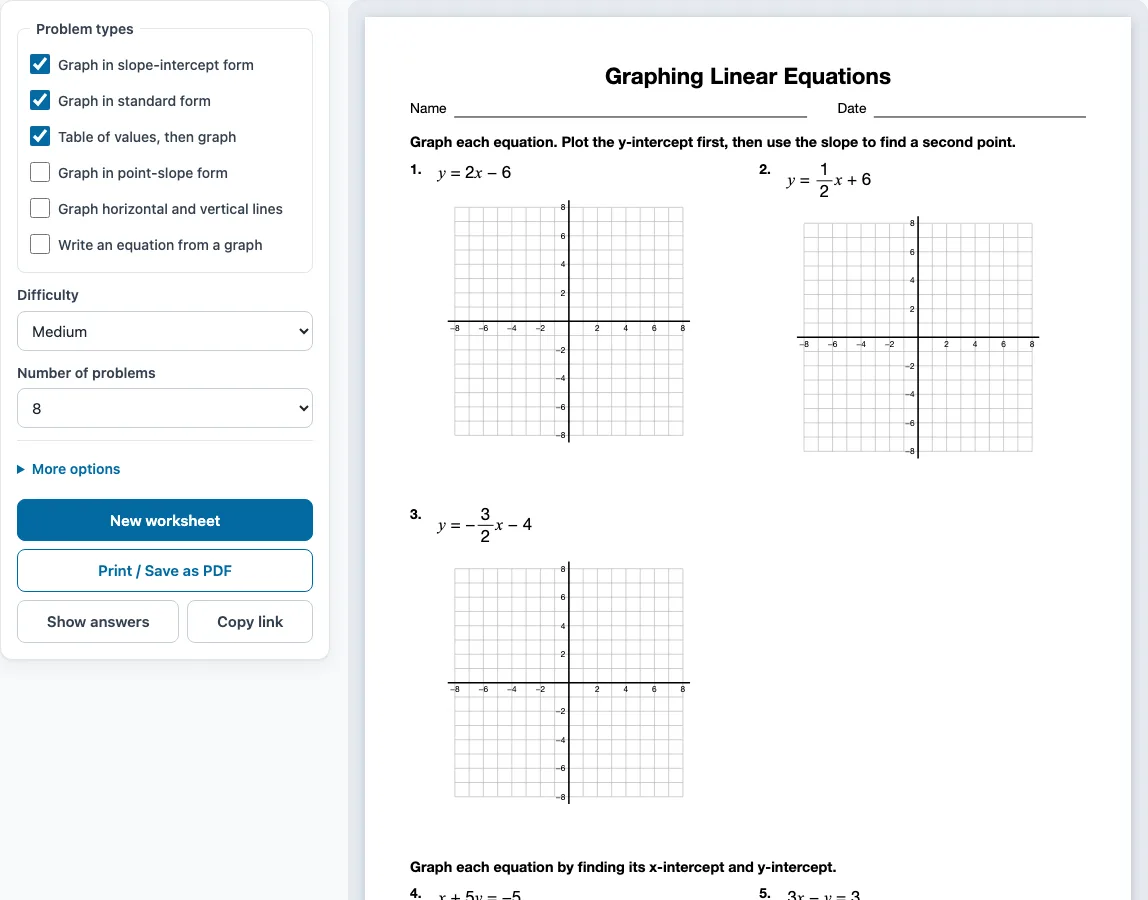
Make printable graphing lines practice – every problem has its own blank coordinate grid, and the answer key draws each line through two marked points.
Recent
Your last 10 settings, saved only in this browser. Nothing is uploaded.
This free Graphing Linear Equations Worksheet Generator makes printable graphing linear equations worksheets, with an answer key, right in your web browser. It needs no sign-up, and nothing is uploaded because the problems are made on your own device.
Use it for a graphing lines worksheet for homework, a linear equations and graphing worksheet for a class, or a graphing linear equations assignment for tutoring. You can choose one or more problem types, including graphing in slope-intercept form, graphing in standard form, making a table of values before graphing, graphing in point-slope form, graphing horizontal and vertical lines, and writing an equation from a graph. It works on phones and tablets as well as computers, and everything you make is free to use in class or in products you sell, such as Teachers Pay Teachers resources.
How to use the Graphing Linear Equations Worksheet Generator
- Tick one or more boxes under Problem types. If you tick several, the problems are shared out evenly and grouped by type.
- Choose a Difficulty: Easy, Medium or Hard.
- Choose the Number of problems, from 6 up to 30.
- Open More options to set the Columns (Automatic, 1, 2 or 3), the Paper size (Letter 8.5 × 11 in or A4 210 × 297 mm), a Worksheet title, and the Name and date line checkbox. The Answer key on a separate page box is on by default. Untick it if you do not want a key.
- Check the preview on the right. It shows the sheet as it will print.
- Click Show answers to see each answer under its problem in the preview. Click it again to hide the answers.
- Click New worksheet for a fresh random set with the same settings.
- Click Print / Save as PDF to open the browser’s print dialog. Choose Save as PDF there to get a PDF file.
Your settings are remembered in this browser for your next visit, unless you open a shared link, which uses that link’s settings. Click Copy link to copy a link that opens exactly the same worksheet again. Printing needs a printer or the Save as PDF option.
How do you graph a linear equation?
To graph a linear equation, find at least two points that make the equation true, plot them on a coordinate grid, and draw one straight line through them. Every linear equation has a straight-line graph, so two correct points are enough, although a third point is a useful check.
Pick x-values, work out y for each one, and plot the pairs (x, y). A table of values is the simplest way to keep these organised. Points with whole-number coordinates, such as (0, 1) and (2, 5), are the easiest to plot accurately. Use a ruler, extend the line to the edges of the grid, and add arrows at both ends to show that it keeps going.
Two special cases follow simpler rules. The equation y = k is a horizontal line through (0, k). The equation x = k is a vertical line through (k, 0).
How do you graph y = mx + b?
Plot the y-intercept (0, b) first. Then use the slope m, written as rise over run, to reach a second point, and draw the line through both. For y = 2x + 4, plot (0, 4), move right 1 and up 2 to reach (1, 6), and connect the two points.
A fraction slope works the same way. For y = (2/3)x + 1, start at (0, 1), move right 3 and up 2 to reach (3, 3). A negative slope falls as you move right. For y = -2x + 3, start at (0, 3), move right 1 and down 2 to reach (1, 1).
Standard form, Ax + By = C, is often quicker with intercepts. Set y = 0 to find the x-intercept, and set x = 0 to find the y-intercept. For x + 3y = 6, the x-intercept is 6 and the y-intercept is 2. Plot both points and connect them with a straight line.
Sample problems from this generator
- y = 3x − 4 Answer: m = 3, b = −4
- y = −3x − 6 Answer: m = −3, b = −6
- 3x + 2y = −6 Answer: x-intercept −2, y-intercept −3
- y = 2x − 4 x: 0, 1, 2, 3 Answer: y: −4, −2, 0, 2
Frequently asked questions
Can I put these graphing linear equations worksheets in a workbook or a KDP book?
Yes. Everything you make here is royalty-free for personal, classroom and commercial use, including Teachers Pay Teachers, Etsy printables, KDP workbooks and print-on-demand products. No credit is required. The only thing you may not do is copy the generator or the site itself to run a competing service. See the terms.
How do I save the worksheet as a PDF?
Click Print / Save as PDF, then choose Save as PDF in the browser’s print dialog. Printing on paper needs a printer.
Does the answer key show the graphs?
Yes. The answer key lists every problem number with its answer. Where the answer is a line, the key draws it through two marked lattice points.
How do I make a worksheet without an answer key?
The answer key is on a separate page by default. Untick Answer key on a separate page under More options before you print.
How do you write the equation of a line from a graph?
Read two lattice points on the line, then find the slope as rise over run. The y-intercept gives you b in y = mx + b. For a line through (0, 1) and (2, 5), the slope is 4 ÷ 2 = 2 and b = 1, so the equation is y = 2x + 1.
Can I make a different set of problems for each student?
Yes. Each click on New worksheet gives different problems with the same settings. You can print several versions, such as one per row of desks, or let a student practise again with new numbers. No problem repeats on one sheet.
Related tools
- Slope worksheets: use these to practise finding slope from two points or from a graph before you graph lines.
- Parallel and perpendicular lines worksheets: use these when students need to compare the slopes of two lines.
- Systems of equations worksheets: use these when students graph two linear equations to find where they cross.
- Functions worksheets: use these to practise deciding whether a relation is a function.
- Literal equations worksheets: use these to practise rearranging formulas, such as solving for y before graphing.
- Domain and range worksheets: use these to practise finding the inputs and outputs a graph can take.
- Algebra worksheets: use this page to browse all the algebra worksheet generators.