Solving Inequalities Worksheet Generator
Make printable inequality practice with a number line under every problem – solve, graph, and check against the graphed answer key.
Recent
Your last 10 settings, saved only in this browser. Nothing is uploaded.
How to use the Inequalities Worksheet Generator
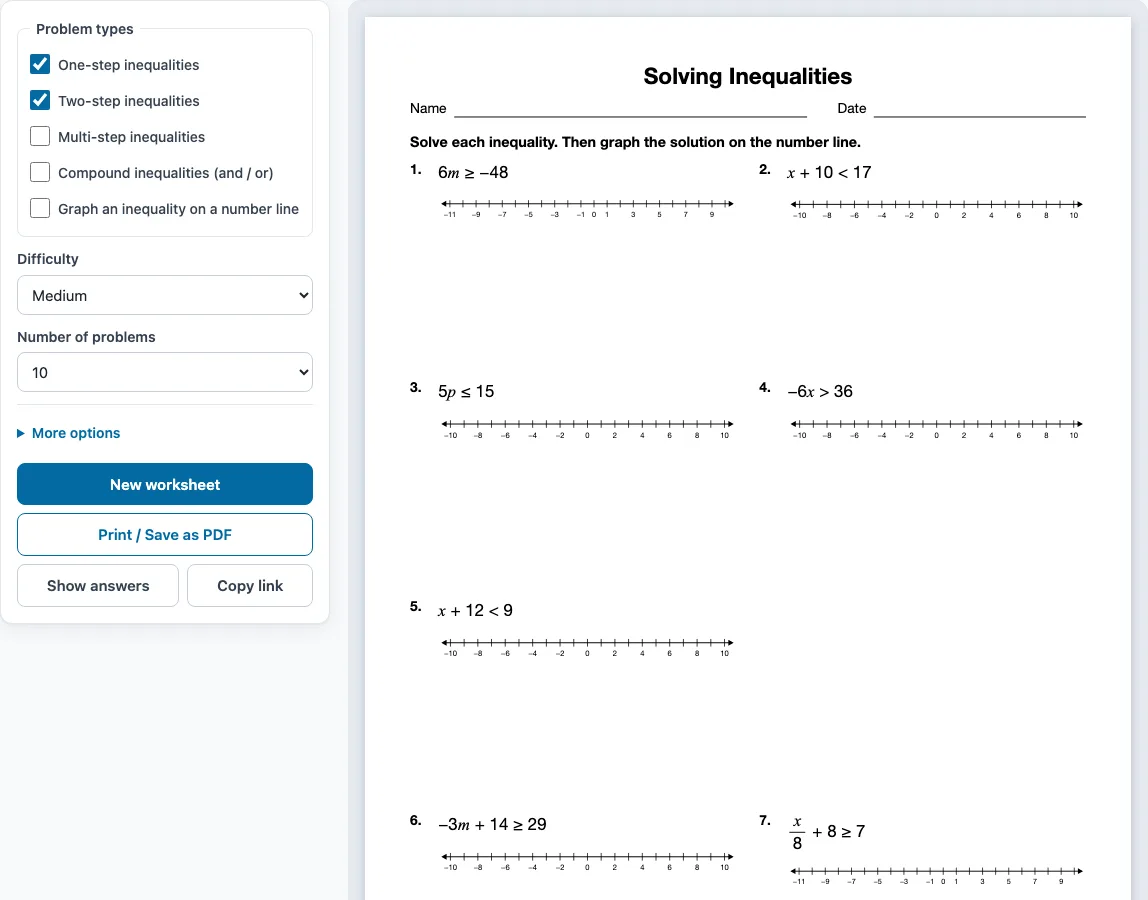
- Tick one or more boxes under Problem types. One-step and Two-step inequalities are ticked when the page opens. If you tick several types, the problems are shared out evenly and grouped by type, each group with its own instruction.
- Choose a Difficulty: Easy, Medium or Hard.
- Pick the Number of problems, from 6 up to 30.
- Open More options to set the Columns (Automatic, 1, 2 or 3), the Paper size (Letter 8.5 × 11 in or A4 210 × 297 mm), a Worksheet title, and whether to add a Name and date line. The Answer key on a separate page box is on by default.
- Check the preview on the right, which shows the sheet as it will print. Press Show answers to see each answer under its problem on screen. Press it again to hide them.
- Press New worksheet for a different random set with the same settings.
- Press Print / Save as PDF. In the print dialog, choose Save as PDF if you want a file.
Press Copy link to copy a link that opens the same worksheet again. The settings are remembered in this browser for your next visit, unless you open a shared link, which uses that link’s settings. The tool works on phones and tablets as well. Printing needs a printer, or you can use Save as PDF.
When do you flip the inequality sign
You flip the inequality sign only when you multiply or divide both sides by a negative number. Every other step, including adding or subtracting and multiplying or dividing by a positive number, keeps the sign the same.
Solve an inequality the way you would solve an equation, and watch for that one rule. Take −9 − 6x ≤ −45. Add 9 to both sides to get −6x ≤ −36. Now divide both sides by −6. Because the divisor is negative, the sign flips from ≤ to ≥, which gives x ≥ 6. Check it: when x = 6, the left side is −9 − 36 = −45, which satisfies the original inequality.
The flip happens because a negative multiplier reverses the order of numbers. For example, 3 > −2, but after multiplying both sides by −1 you get −3 < 2. The flipped sign is written as < becomes >, > becomes <, ≤ becomes ≥, and ≥ becomes ≤.
How do you graph an inequality on a number line (open vs closed circle)
Mark the endpoint with a circle, then draw an arrow from it in the direction of the solutions. Use an open circle for < or > because the endpoint is not included. Use a closed (filled) circle for ≤ or ≥ because the endpoint is included.
For x ≥ 2, place a closed circle at 2 and draw the arrow to the right. For x < −5, place an open circle at −5 and draw the arrow to the left. Check your arrow direction by testing a number from the arrow’s side. For x ≥ 2, the number 4 should be in the solution, and it is on the right of 2.
How do you solve a compound inequality?
For an “and” inequality written in one line, such as −3 < 2x + 1 ≤ 9, do the same step to all three parts: subtract 1 to get −4 < 2x ≤ 8, then divide by 2 to get −2 < x ≤ 4. For an “or” inequality, solve the two parts separately and keep both answers, for example x ≤ 4 or x ≥ 8.
Sample problems from this generator
- p − 7 ≤ −15 Answer: p ≤ −8
- p5 ≤ 2 Answer: p ≤ 10
- m5 + 8 < 7 Answer: m < −5
- x8 + 10 ≤ 9 Answer: x ≤ −8
Frequently asked questions
Is there an answer key with the graphs?
Yes. The answer key is on by default and starts on a new page after the worksheet. It lists every problem number with the solved inequality and draws the solution on a number line.
Can I save a solving inequalities worksheet as a PDF?
Yes. Press Print / Save as PDF, then choose Save as PDF in the browser’s print dialog. The sheet is made on your device, so nothing is uploaded.
What is a compound inequality?
A compound inequality joins two inequalities with “and” or “or.” With “and,” as in −3 < 2x + 1 ≤ 9, the solutions overlap and form a segment between two endpoints. With “or,” as in x ≤ 4 or x ≥ 8, the solution is two rays that point away from each other.
Can I get a different set of problems with the same settings?
Yes. Each press of New worksheet gives new random problems, which is useful for printing several versions for different desks or for more practice.
What does the “Graph an inequality” problem type ask for?
It gives you an inequality, such as 5 ≤ x ≤ 8, and asks you to draw it on the number line. There is no solving step. The key shows the finished graph.
Do I need to sign up or download anything?
No. The generator is free, needs no sign-up, and runs in your web browser. It also works on phones and tablets.
Are the inequalities worksheets I make here free for commercial use?
Yes. The worksheets and answer keys you generate are free for personal, classroom and commercial use, such as Teachers Pay Teachers products, Etsy listings or a printed workbook. You do not need to credit this site. You may not copy the generator itself and offer it as your own tool.
Related tools
- Solving equations worksheets: Use these when you want practice solving equations before moving on to inequalities.
- Integers worksheets: Use these to practise working with negative numbers, which matter when you flip signs.
- Systems of equations worksheets: Use these when you are ready to solve two equations together.
- Slope worksheets: Use these to practise the rate of change that appears in linear equations and inequalities.
- Pre-algebra worksheets: Use these for a broader review of the operations and number skills behind algebra.
- Algebra worksheets: Use this page to browse all the algebra worksheet generators on the site.
- Absolute value worksheets: use these for absolute value inequalities graphed on a number line.