Mean, Median, Mode and Range Worksheet Generator
Make printable mean, median, mode and range practice with word problems, missing values and an answer key.
Recent
Your last 10 settings, saved only in this browser. Nothing is uploaded.
This mean, median, mode and range worksheet generator makes printable practice sheets in your web browser. You choose the problem types, the difficulty and the number of problems, then print the sheet or save it as a PDF with an answer key on a separate page. It is free, needs no sign-up, and nothing is uploaded.
There are ten problem types. Four ask for one measure of a data set: the mean, the median, the mode or the range. The others ask for all four at once, a missing value that gives a target mean, word problems about test scores and temperatures, the effect of an outlier, a comparison of two data sets, and the mean and mode from a frequency list. Each new worksheet uses a new random set of numbers.
You can use the sheets in class or in a tutoring business, with no credit needed.
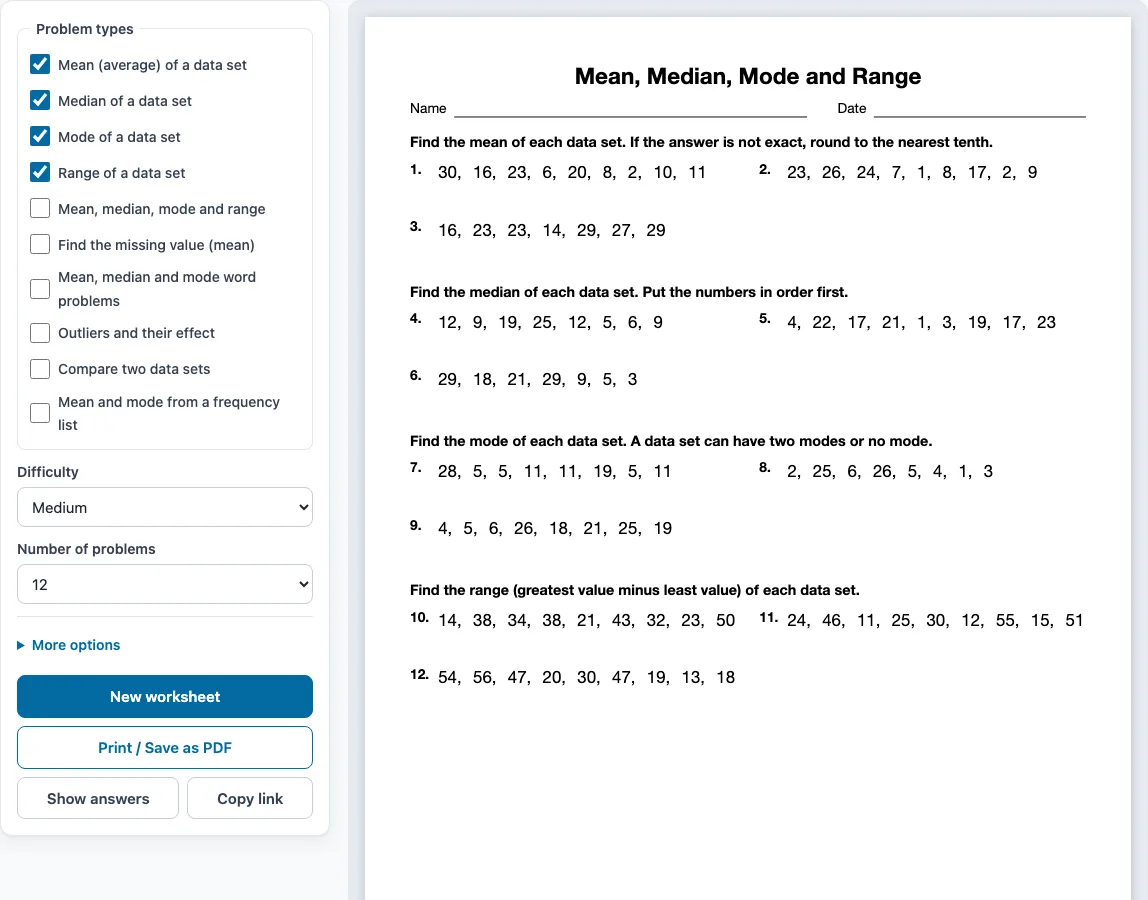
How to use the Mean, Median, Mode and Range Worksheet Generator
- Tick one or more boxes under Problem types. The boxes ticked when the page opens are Mean (average) of a data set, Median of a data set, Mode of a data set and Range of a data set.
- Choose a level under Difficulty: Easy, Medium or Hard.
- Pick how many problems you want under Number of problems, from 6 to 30.
- Open More options to set the Columns (Automatic, 1, 2 or 3), the Paper size (Letter 8.5 × 11 in or A4 210 × 297 mm), a Worksheet title and the Name and date line.
- Check the preview on the right. Press Show answers to see each answer under its problem, and press it again to hide them.
- Press New worksheet for a fresh random set with the same settings. When you are ready, press Print / Save as PDF, then choose Save as PDF in the print dialog to get a file. Unticking every box leaves the sheet empty, so keep at least one type ticked.
When you tick more than one problem type, the problems are shared out evenly and grouped by type, with a one-line instruction above each group. Copy link saves the problem set as a link, so the same worksheet opens again later. Your settings are remembered in this browser, unless you open a shared link.
What are mean, median, mode and range?
These four numbers describe a data set. The mean is the sum of the values divided by how many values there are. The median is the middle value once the data are in order. The mode is the value that appears most often. The range is the greatest value minus the least value.
For 3, 5, 5, 8, 9 the mean is 30 ÷ 5 = 6, the median is 5, the mode is 5 and the range is 9 − 3 = 6.
How do you find the median when there is an even number of values?
Put the values in order, then take the mean of the two middle values. For 2, 4, 6, 10 the middle values are 4 and 6, so the median is (4 + 6) ÷ 2 = 5. The Median type on this page includes both odd and even counts, with the data given in no particular order, so students have to sort first.
Can a data set have no mode or two modes?
Yes. If every value appears the same number of times there is no mode, and if two values tie for most often the data set has two modes (it is bimodal). From Medium level the Mode type includes both cases, and the answer key writes them out, for example no mode or 4 and 7.
How does an outlier change the mean and the median?
An outlier is a value far from the rest. It pulls the mean toward it, because every value counts in the sum, while the median usually barely moves, because it depends only on the middle of the ordered list. The Outliers type asks students to spot the outlier and to say what happens when it is removed.
The Missing value type works the other way round: given the mean of a list and all but one value, students find the last value by working out the total the mean requires.
Sample problems from this generator
- 2, 16, 29, 26, 4, 4, 26, 13 Answer: 15
- 9, 15, 25, 14, 11, 25 Answer: 14.5
- 1, 20, 6, 18, 4, 16, 25, 12, 11 Answer: no mode
- 19, 23, 17, 24, 47, 15, 41, 45 Answer: 32
Frequently asked questions
How do you find the mean, median and mode of a data set?
Add the values and divide by the number of values for the mean. Order the values and take the middle one (or the mean of the middle two) for the median. Count how often each value appears and pick the most frequent for the mode.
Are the answers rounded?
Easy and Medium problems are chosen so that the mean is a whole number or has one decimal place. At Hard level some means are rounded, and the instruction above the group says to what place.
Which problem type should I use for a quick check?
Use Mean, median, mode and range. Each problem gives one data set and asks for all four measures, with the answers written on one line in the answer key.
Can I make a worksheet with word problems only?
Yes. Tick only Mean, median and mode word problems. The sentences come from nine templates, such as test scores, daily temperatures and goals scored, and each asks for one measure.
Does the worksheet come with answers?
Yes. By default the answer key prints on a separate page after the worksheet. Press Show answers to see each answer under its problem in the preview, and untick Answer key on a separate page under More options if you want to leave the key out.
Can I use these worksheets in my class or tutoring business?
Yes. You can use the worksheets you make here at home, in school and in a tutoring business, and you do not need to give credit. You may not resell them as a stand-alone product or copy the generator itself; see the terms.
Related tools
- Percent worksheets: use these for percent problems, a natural next topic after averages.
- Box and whisker plot worksheets: use these to turn a data set into a five-number summary and a box plot.
- Probability worksheets: use these for chance and likelihood problems from the same unit.
- Integers worksheets: use these to practise the negative numbers that appear in Hard range problems.
- Unit rate worksheets: use these for rates, another kind of number that summarises quantities.
- Order of operations worksheets: use these to practise evaluating (sum) ÷ count correctly.
- Word problems worksheets: use these for more word problems that turn sentences into equations.
- Pre algebra worksheets: use these for a wider set of skills that come before algebra.