Polynomials Worksheet Generator
Make printable polynomial practice – add, subtract, multiply and divide polynomials, including long division and synthetic division – with an answer key.
Recent
Your last 10 settings, saved only in this browser. Nothing is uploaded.
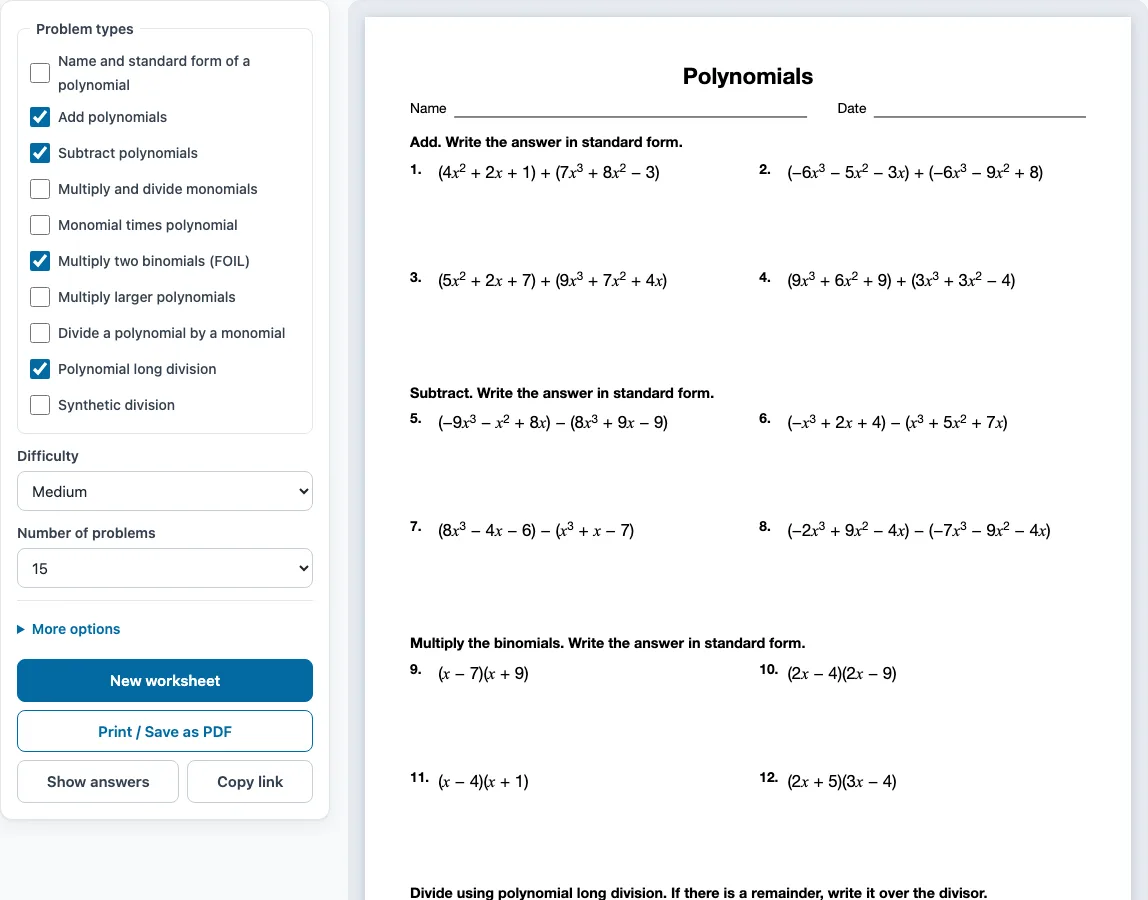
This polynomials worksheet generator is a free browser tool that makes printable polynomial worksheets with an answer key in a few clicks. You choose the problem types, difficulty and number of problems, then print the sheet or save it as a PDF.
The problem types cover naming polynomials in standard form, adding and subtracting, multiplying and dividing monomials, multiplying by a monomial, FOIL and larger products, dividing by a monomial, polynomial long division and synthetic division. There are three difficulty levels, and some Hard sheets use two variables, x and y. The tool runs in your web browser with no sign-up, and the problems are made on your own device rather than uploaded. Everything you make here is free to use in class or in products you sell, such as Teachers Pay Teachers resources, Etsy printables or KDP workbooks.
How to use the polynomials worksheet generator
- Tick one or more boxes under Problem types. When the page opens, Add polynomials, Subtract polynomials, Multiply two binomials (FOIL) and Polynomial long division are already ticked.
- Choose a level under Difficulty: Easy, Medium or Hard.
- Pick a number under Number of problems, from 6 up to 30.
- Open More options to set Columns (Automatic, 1, 2 or 3), Paper size (Letter or A4), a Worksheet title, and the Name and date line checkbox. Leave Answer key on a separate page ticked if you want a key.
- Check the preview on the right. It shows the sheet exactly as it will print.
- Click Show answers to see each answer under its problem on screen. Press it again to hide them.
- Click New worksheet for a fresh random set with the same settings.
- Click Print / Save as PDF. In the print dialog, choose Save as PDF if you want a file.
When you tick several problem types, the problems are shared evenly between them. Each group has its own one-line instruction, and the problems are numbered 1 to N across the sheet. Click Copy link to save a link that reopens the same worksheet. Your settings are remembered in this browser, unless you open a shared link. The tool also works on phones and tablets, but printing needs a printer or Save as PDF.
How do you add and subtract polynomials
To add polynomials, combine like terms, which are terms with the same variable and the same exponent. Add their coefficients and keep the variable part unchanged. For example, (x² + 2x) + (x + 6) becomes x² + 3x + 6, because 2x and x are like terms and the 6 has no partner. Terms such as x² and x are not like terms, so they stay separate.
To subtract, change the sign of every term in the second polynomial, then combine like terms. Skipping the sign change is the most common mistake. For example, (3x² + 9x) − (2x² + 4x) becomes 3x² + 9x − 2x² − 4x, which simplifies to x² + 5x. Write the final answer in standard form, with the highest degree first.
How do you multiply polynomials
Multiply every term in one polynomial by every term in the other, then combine like terms. When both factors are binomials, this method is called FOIL: multiply the First, Outer, Inner and Last terms. For (x + 5)(x + 5), First gives x², Outer gives 5x, Inner gives 5x and Last gives 25. Combining the middle terms gives x² + 10x + 25.
With a larger polynomial, the same rule applies, just with more pairs. For (5x + 2)(x² + 3x + 1), multiply 5x by each term to get 5x³ + 15x² + 5x, then multiply 2 by each term to get 2x² + 6x + 2. Combining like terms gives 5x³ + 17x² + 11x + 2.
When one factor is a monomial, multiply it through each term. For example, 6x(x + 4) = 6x² + 24x. When you multiply powers of the same variable, add the exponents: x · x² = x³.
How do you divide a polynomial by a monomial?
Divide every term of the polynomial by the monomial: divide the coefficients and subtract the exponents. For example, (20x² + 25x) ÷ 5x = 4x + 5, and on Hard sheets (20x²y² + 28x²y + 4xy²) ÷ 4xy = 5xy + 7x + y. For a divisor with two terms, such as x − 5, use long division or synthetic division instead.
Sample problems from this generator
- (−4x2 − 8x − 4) + (−8x2 − 7x − 9) Answer: −12x2 − 15x − 13
- (−2x3 + 6x2 + 2) − (−7x3 − 5x2 − 3) Answer: 5x3 + 11x2 + 5
- (x − 9)(2x + 9) Answer: 2x2 − 9x − 81
- (2x3 + 10x2 + 10x − 6) ÷ (x + 3) Answer: 2x2 + 4x − 2
Frequently asked questions
How do you do polynomial long division?
Set it up like number long division. Divide the first term of the dividend by the first term of the divisor, multiply the result by the whole divisor, subtract, and bring down the next term. Repeat until the remaining degree is lower than the divisor’s degree. Write any remainder as a fraction over the divisor, such as 3x² − 4x − 1 − 2/(x − 5).
What is synthetic division?
Synthetic division is a shortcut for dividing a polynomial by x − a. You write only the coefficients and the number a, then use multiplication and addition in place of long subtraction. For x + 5, the value of a is −5. It works only for divisors of the form x − a, so use long division for other divisors such as 2x + 3.
Can I sell polynomials worksheets made with this generator?
Yes. The worksheets and answer keys you generate are free for personal, classroom and commercial use, such as Teachers Pay Teachers products, Etsy listings or a printed workbook. You do not need to credit this site. You may not copy the generator itself and offer it as your own tool.
What does the answer key show?
When you print, the key starts on a new page after the worksheet and lists every problem number with its answer. Answers are in standard form, and division answers show any remainder as a fraction over the divisor. Untick the answer key box if you don’t need one.
Will I get the same problems if I print again?
No. Each click on New worksheet creates a different random set with the same settings, and no problem repeats on one sheet. You can print several versions for different desks or practise again with new numbers. Use Copy link if you want to reopen a set you have already chosen.
What do the Hard problems look like?
Hard problems use higher degrees, more terms and, on some sheets, two variables. For example, (3x² − 5x + 5)(2x² + 3x − 1) = 6x⁴ − x³ − 8x² + 20x − 5. Start with Easy or Medium if you are new to a topic, then move up once the steps feel routine.
Related tools
- Factoring worksheets: use these after multiplying, to practise reversing a product into its factors.
- Exponents worksheets: use these to review the exponent rules needed when multiplying and dividing monomials.
- Rational expressions worksheets: use these once you can divide polynomials, to simplify fractions built from them.
- Algebraic expressions worksheets: use these to practise combining like terms before moving to polynomials.
- Algebra 2 worksheets: use these for a wider set of topics at the next level of study.