Scientific Notation Worksheets Generator
Make printable scientific notation practice with large and small numbers, from converting to calculating, and check it with the answer key.
Recent
Your last 10 settings, saved only in this browser. Nothing is uploaded.
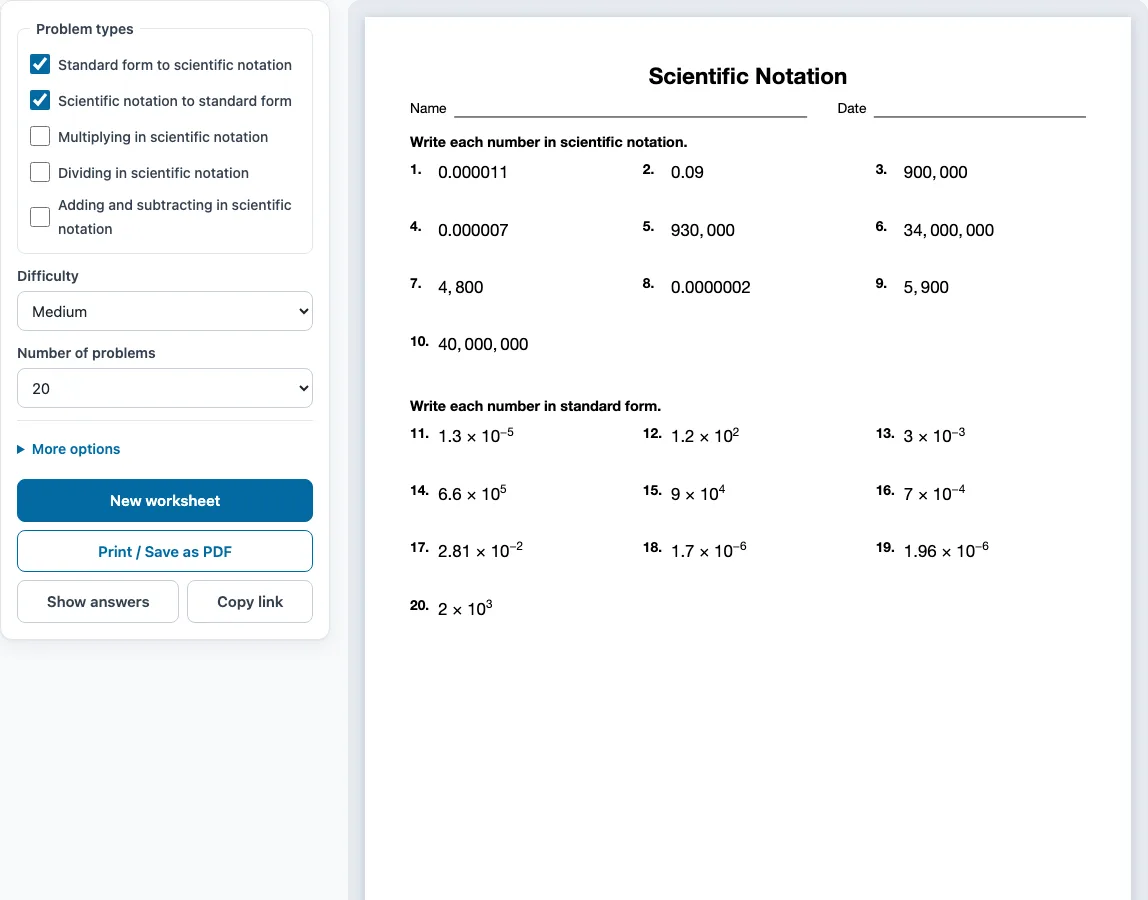
How to use the scientific notation worksheet generator
- Tick one or more boxes under Problem types. The two ticked when the page opens are Standard form to scientific notation and Scientific notation to standard form. If you tick several, the problems are shared evenly between them, grouped by type, with a one-line instruction for each group.
- Choose a Difficulty: Easy, Medium or Hard.
- Choose the Number of problems: 6, 8, 10, 12, 15, 20, 24 or 30.
- Open More options to change the layout. Pick Columns (Automatic, 1, 2 or 3) and Paper size (Letter or A4). Type a Worksheet title if you want one at the top, and tick Name and date line to add a line for it.
- Check the preview on the right. Press Show answers to display each answer under its problem on screen. Press it again to hide them.
- Press New worksheet for a fresh random set with the same settings, or Print / Save as PDF to open the print dialog.
Your settings are remembered in this browser for your next visit. Copy link copies a link that opens exactly the same worksheet, which is useful for sharing a set. The page also works on phones and tablets, but printing needs a printer or the Save as PDF option.
How do you write a number in scientific notation?
Scientific notation writes a number as a × 10ⁿ, where 1 ≤ a < 10 and n is a whole number. The coefficient a is always at least 1 and less than 10, so it has exactly one non-zero digit before the decimal point. On these sheets, coefficients have at most three significant digits.
To convert, move the decimal point until one non-zero digit is left of it. The number of places you moved is the exponent. Moving left gives a positive exponent, which is the case for large numbers. Moving right gives a negative exponent, which is the case for numbers between 0 and 1. For example, 9,000,000 moves 6 places left to become 9 × 10⁶. The number 0.0000000000887 moves 11 places right to become 8.87 × 10⁻¹¹.
How do you multiply and divide in scientific notation?
To multiply, multiply the coefficients and add the exponents. If the new coefficient is 10 or more, move its decimal point one place left and add 1 to the exponent. For example, (6 × 10⁶)(8 × 10⁶) = 48 × 10¹² = 4.8 × 10¹³.
To divide, divide the coefficients and subtract the exponent of the divisor from the exponent of the number being divided. If the new coefficient is less than 1, move its decimal point one place right and subtract 1 from the exponent. For example, (5.4 × 10⁴) ÷ (3 × 10⁻³): 5.4 ÷ 3 = 1.8, and 4 − (−3) = 7, so the answer is 1.8 × 10⁷.
How do you add numbers in scientific notation?
First make the powers of ten match by rewriting one number, then add or subtract the coefficients and keep the power. For example, 1.8 × 10⁵ + 4 × 10⁶ = 0.18 × 10⁶ + 4 × 10⁶ = 4.18 × 10⁶. Hard add and subtract problems start with different powers like this.
How do you convert scientific notation to standard form?
Reverse the conversion: move the decimal point as many places as the exponent says. A positive exponent moves it to the right and makes the number large; a negative exponent moves it to the left and makes the number smaller than 1. Fill empty places with zeros. For 9 × 10⁶, move six places right to get 9,000,000. For 8.87 × 10⁻⁹, move nine places left to get 0.00000000887. Standard-form answers on these sheets use commas between groups of three digits, so large numbers are easy to read and check.
Sample problems from this generator
- 0.0000026 Answer: 2.6 × 10⁻⁶
- 0.097 Answer: 9.7 × 10⁻²
- 1.01 × 10⁻³ Answer: 0.00101
- 8.53 × 10⁻⁴ Answer: 0.000853
Frequently asked questions
Is there an answer key?
Yes. The Answer key on a separate page box is ticked by default under More options. When you print, the key starts on a new page after the worksheet and lists every problem number with its answer. Untick the box if you do not want a key.
Can I make several versions of the same worksheet?
Yes. Each click on New worksheet gives different problems with the same settings. Teachers can print one version per row of desks, and students can practise again with new numbers. No problem repeats on one sheet.
Why must the coefficient be at least 1 and less than 10?
It is the agreed standard form: with exactly one non-zero digit before the decimal point, every number has only one way to be written, so numbers are easy to compare by their exponents first. That is why 48 × 10¹² is rewritten as 4.8 × 10¹³ in the answers.
Is the generator free, and do I need to sign up?
Yes to both. It is free and needs no sign-up. It runs in your browser, and the problems are made on your device. Nothing is uploaded.
How do I save the worksheet as a PDF?
Press Print / Save as PDF to open your browser’s print dialog, then choose Save as PDF as the destination. Your paper size setting (Letter or A4) applies to the file.
Can I use these scientific notation worksheets for commercial use?
Yes. The worksheets and answer keys you generate are free for personal, classroom and commercial use, such as Teachers Pay Teachers products, Etsy listings or a printed workbook. You do not need to credit this site. You may not copy the generator itself and offer it as your own tool.
Related tools
- Exponents worksheets: Use these when you need practice with powers before working with the 10ⁿ part of scientific notation.
- Integers worksheets: Use these to practise adding and subtracting negative numbers, which you need when you add or subtract negative exponents.
- Pre-algebra worksheets: Use these for a broader review of the number skills that come before algebra.
- Simplifying radicals worksheets: Use these to practise simplifying expressions once you are comfortable with powers.
- Solving equations worksheets: Use these to practise isolating an unknown, a skill that helps with multi-step exponent problems.
- Algebra worksheets: Use this page to browse every worksheet generator on the site.