Simple Interest Worksheet Generator
Make printable simple interest practice – I = Prt problems for interest, total, rate, principal and time, plus compound interest – with an answer key.
Recent
Your last 10 settings, saved only in this browser. Nothing is uploaded.
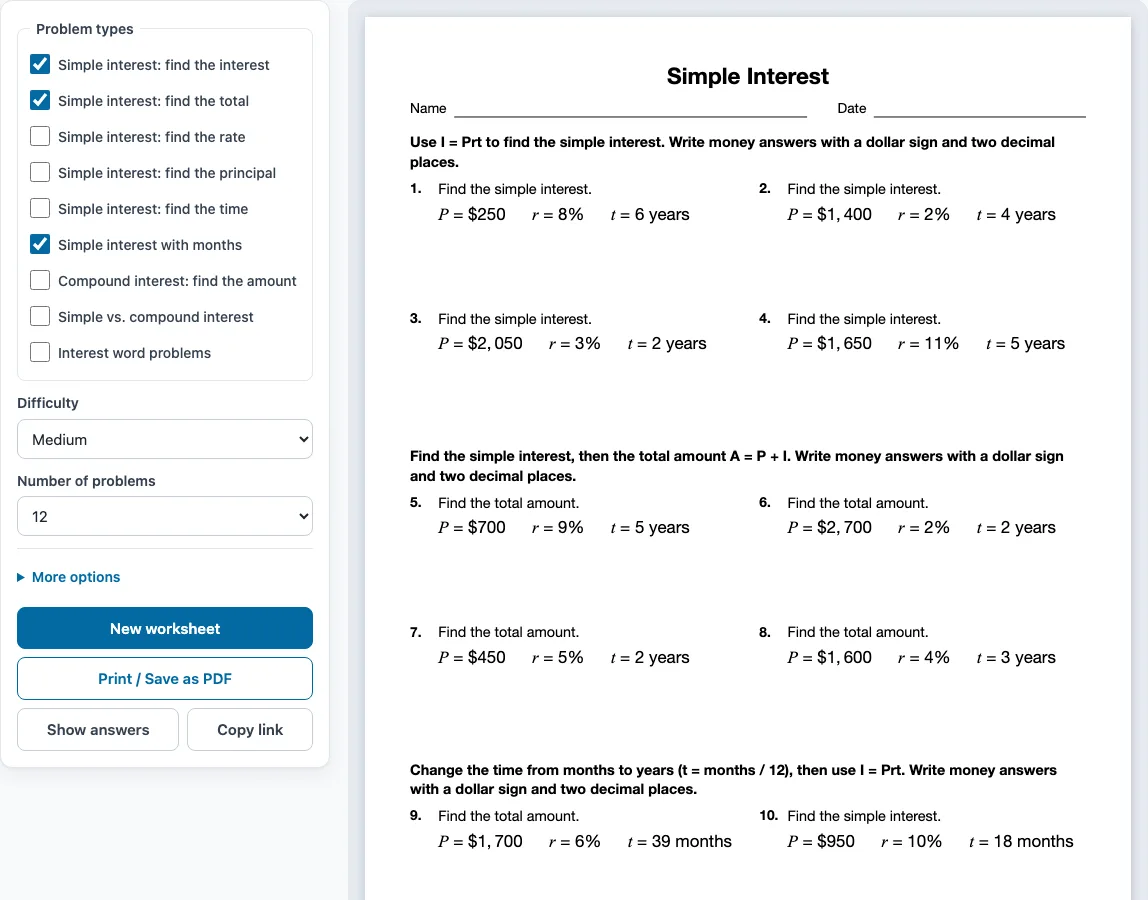
How to use the Simple Interest Worksheet Generator
- Tick one or more boxes under Problem types. The boxes ticked when the page opens are Simple interest: find the interest, Simple interest: find the total and Simple interest with months.
- Choose a level under Difficulty: Easy, Medium or Hard.
- Pick how many problems you want under Number of problems, from 6 to 30.
- Open More options to set the Columns (Automatic, 1, 2 or 3), the Paper size (Letter 8.5 × 11 in or A4 210 × 297 mm), a Worksheet title and the Name and date line.
- Check the preview on the right. Press Show answers to see each answer under its problem, and press it again to hide them.
- Press New worksheet for a fresh random set with the same settings. When you are ready, press Print / Save as PDF, then choose Save as PDF in the print dialog to get a file.
When you tick more than one problem type, the problems are shared out evenly and grouped by type, with a one-line instruction above each group. Copy link saves the problem set as a link, so the same worksheet opens again later. Your settings are remembered in this browser, unless you open a shared link, which uses that link’s settings.
What is the simple interest formula
Simple interest is found with I = Prt, where P is the principal (the amount borrowed or saved), r is the yearly rate written as a decimal, and t is the time in years. To find the total amount, add the interest to the principal: A = P + I.
To use the formula, change the percent to a decimal first, so 6% becomes 0.06. For $600 at 6% for 4 years, the interest is 600 × 0.06 × 4 = $144, and the total is $600 + $144 = $744. If the time is given in months, divide by 12 to get years, so 30 months is 2.5 years. Simple interest is always worked out on the original principal, so the same amount of interest is added every year.
How do you find the principal?
Divide the interest by the rate times the time: P = I ÷ (r × t). If $144 of interest was earned at 6% over 4 years, then P = 144 ÷ (0.06 × 4) = 144 ÷ 0.24 = $600. The Simple interest: find the principal type asks this question, and the find the rate and find the time types rearrange the same formula.
What is the difference between simple and compound interest
Simple interest is paid only on the original principal. Compound interest is paid on the principal and on interest that has already been added, so the balance grows faster. For the same P, r and t, compound interest gives more than simple interest as soon as interest has been added more than once, and the gap grows as time goes on.
How often interest is added is called the compounding period. It can be annually (once a year), semiannually (twice a year), quarterly (4 times a year) or monthly (12 times a year). For example, $900 at 9% for 5 years earns $405.00 in simple interest, so the total is $1,305.00. Compounded quarterly, the total is $1,404.46. The compound interest earns $99.46 more.
Sample problems from this generator
- Find the simple interest. P = $2,950 r = 6% t = 8 years Answer: $1,416.00
- Find the simple interest. P = $3,000 r = 4% t = 2 years Answer: $240.00
- Find the total amount. P = $800 r = 6% t = 6 years Answer: $1,088.00
- Find the simple interest. P = $450 r = 8% t = 15 months Answer: t = 1.25 years I = $45.00
Frequently asked questions
How do you find the rate or time in simple interest?
Rearrange I = Prt. The rate is r = I ÷ (P × t), and the time is t = I ÷ (P × r). For example, if I = $72, P = $900 and t = 2 years, then r = 72 ÷ (900 × 2) = 0.04, which is 4%.
How do you calculate compound interest?
Use A = P(1 + r/n)^(nt), where n is the number of times interest is added each year (1 for annually, 2 for semiannually, 4 for quarterly, 12 for monthly). Write r as a decimal, work out the brackets, then the power, multiply by P and round to the nearest cent. For $900 at 9% compounded quarterly for 5 years, A = 900(1 + 0.09/4)^20 = $1,404.46.
Can I sell simple interest worksheets made with this generator?
Yes. Everything you make here is royalty-free for personal, classroom and commercial use, including Teachers Pay Teachers, Etsy printables, KDP workbooks and print-on-demand products. No credit is required. The only thing you may not do is copy the generator or the site itself to run a competing service. See the terms.
Does the worksheet come with answers?
By default, the answer key prints on a separate page after the worksheet, listing every problem number with its answer. Money answers have a dollar sign, commas and two decimal places. To leave the key out, untick Answer key on a separate page under More options.
Can students use the generator on a phone or tablet?
Yes. It works on phones and tablets as well as on computers. Printing needs a printer or the Save as PDF option, so a student without a printer can save the sheet as a file and open it later.
Related tools
- Percent worksheets: use these to practise converting percents to decimals before you apply the rate in I = Prt.
- Literal equations worksheets: use these to practise rearranging a formula such as I = Prt to solve for r or t.
- Equation word problems worksheets: use these for more practice turning written situations into equations.
- Exponents worksheets: use these to work through the powers in the compound interest formula.
- Unit rate worksheets: use these for rates, unit prices and better-buy money problems.
- Pre-algebra worksheets: use these for a wider set of skills that come before algebra.