Solving Equations Worksheet Generator
Printable equation practice from one-step to variables on both sides, with whole-number answers and an answer key on its own page.
Recent
Your last 10 settings, saved only in this browser. Nothing is uploaded.
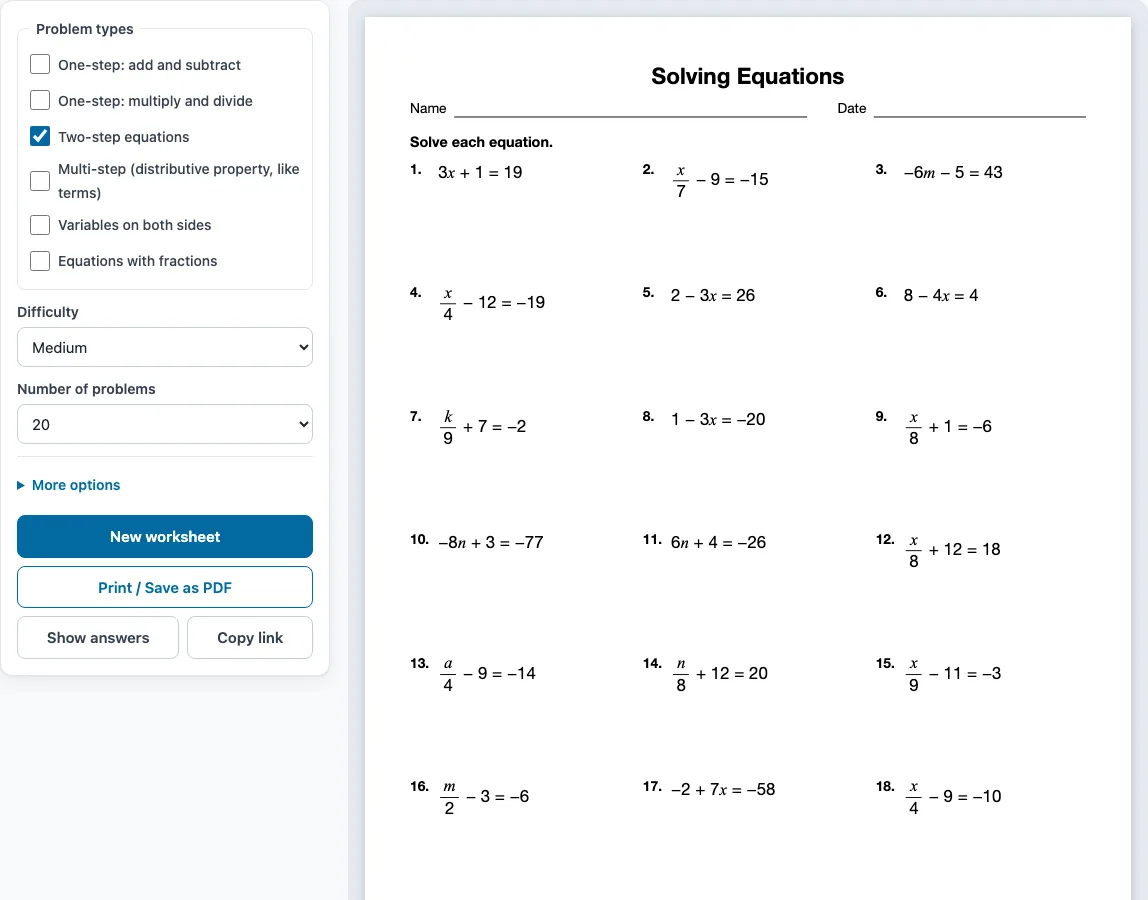
How to use the Solving Equations Worksheet Generator
- Under ‘Problem types’ on the left, tick one or more types. Two-step equations is ticked when the page opens. If you tick several, the problems are shared evenly between them and grouped by type.
- Choose a level under ‘Difficulty’: Easy, Medium or Hard.
- Pick how many problems you want under ‘Number of problems’, from 6 to 30.
- Open ‘More options’ to set the Columns (Automatic, 1, 2 or 3), the Paper size (Letter or A4), a Worksheet title, and the Name and date line. The answer key on a separate page is on by default.
- Check the preview on the right, which shows the sheet as it will print. Press ‘Show answers’ to see the answers under each problem, and press it again to hide them.
- Press ‘New worksheet’ for a different random set with the same settings.
- Press ‘Print / Save as PDF’ to open the browser’s print dialog. Choose ‘Save as PDF’ there if you want a PDF file instead of paper.
Your settings are remembered in this browser for your next visit. ‘Copy link’ copies a link that opens exactly the same worksheet again. If you open a shared link, it uses the settings stored in that link instead.
How do you solve two-step equations?
To solve a two-step equation, undo the addition or subtraction first, then undo the multiplication or division. Do the same thing to both sides every time, until the variable is alone.
Take 15 − 9x = 69. First subtract 15 from both sides to get −9x = 54. Then divide both sides by −9 to get x = −6. To check, substitute −6 into the original equation: 15 − 9(−6) = 15 + 54 = 69, which matches the right side.
How do you solve equations with variables on both sides?
Move all the terms with the variable to one side, and all the plain numbers to the other side. Then divide both sides to leave the variable alone. If a side has brackets or like terms, simplify that side first.
Take 5x + 8 = 3x + 26. Subtract 3x from both sides to get 2x + 8 = 26. Subtract 8 from both sides to get 2x = 18. Divide by 2 to get x = 9.
How do you solve multi-step equations and equations with fractions?
For a multi-step equation, simplify each side first: distribute any number in front of parentheses, then combine like terms, and only then move terms across. A Hard example from the generator is −3(p + 8) − (p − 1) = −39. Distributing gives −3p − 24 − p + 1 = −39, combining gives −4p − 23 = −39, so −4p = −16 and p = 4. Watch the minus sign in front of (p − 1): it changes the sign of both terms inside.
For an equation with fractions, multiply every term on both sides by the least common denominator so that the fractions disappear. In (5/3)p − 3 = (4/3)p − 7 the denominator is 3, so multiplying through gives 5p − 9 = 4p − 21, and p = −12.
Answers on every worksheet are whole numbers, so checking by substitution will quickly tell you if a step went wrong.
One-step equations need a single inverse operation: x − 18 = −8 becomes x = 10 after adding 18 to both sides, and x/11 = 6 becomes x = 66 after multiplying both sides by 11.
Sample problems from this generator
- 7 − 3p = 28 Answer: p = −7
- 7y + 1 = 43 Answer: y = 6
- −10 + 7a = −59 Answer: a = −7
- m3 + 5 = 11 Answer: m = 18
Frequently asked questions
Are the answers included?
Yes. The answer key is on by default under ‘More options’ and prints on a separate page after the worksheet, listing every problem number with its answer. To see answers on screen, press ‘Show answers’.
Can I save the worksheet as a PDF?
Yes. Press ‘Print / Save as PDF’ to open the browser’s print dialog, then choose ‘Save as PDF’. Printing or saving needs a printer or this browser option.
Which problem type should I choose for a one step solving equations worksheet?
Tick ‘One-step: add and subtract’, ‘One-step: multiply and divide’, or both to mix them. Ticking both shares the problems evenly and groups them under their own instructions.
Are the answers always whole numbers?
Yes. All answers are integers. At Easy level they are positive, while Medium and Hard use negative numbers and letters other than x, such as n, a, m, y, k and p.
How do I make a different worksheet with the same settings?
Press ‘New worksheet’. Each click gives different problems with your current settings, so you can print several versions for a class or practise again with new numbers.
Does this work on a phone or tablet?
Yes. The generator works on phones and tablets as well as computers. Printing needs a printer, or you can use ‘Save as PDF’ on the device.
Are the solving equations worksheets I make here free for commercial use?
Yes. You can sell what you make here, for example as a Teachers Pay Teachers resource, an Etsy download or pages in a KDP book. It is royalty-free and needs no credit line. The only limit is that you may not mirror or resell the site or its generators as a competing service.
Related tools
- Inequalities worksheets: Use these when you are ready to solve statements with less than or greater than signs.
- Pre-algebra worksheets: Use these to practise the number skills, such as the order of operations and combining like terms, that come before solving equations.
- Integers worksheets: Use these to practise adding, subtracting and multiplying negative numbers, which appear in Medium and Hard equations.
- Systems of equations worksheets: Use these when you need to solve two equations with two variables at the same time.
- Quadratic equations worksheets: Use these when your equations include a squared variable.
- Algebra worksheets: Use this page to browse the full range of algebra worksheet generators.
- Slope worksheets: Use these to practise finding the slope of a line from points or an equation.
- Equation word problems worksheets: use these when students should write the equation from a situation before solving it.
- Literal equations worksheets: use these to solve formulas for a chosen variable.
- Distributive property worksheets: use these for equations such as 3(x − 2) = 12.