Graphing Systems of Equations Worksheet Generator
Print systems of linear equations to solve by graphing, substitution or elimination – the answer key draws both lines and marks the solution.
Recent
Your last 10 settings, saved only in this browser. Nothing is uploaded.
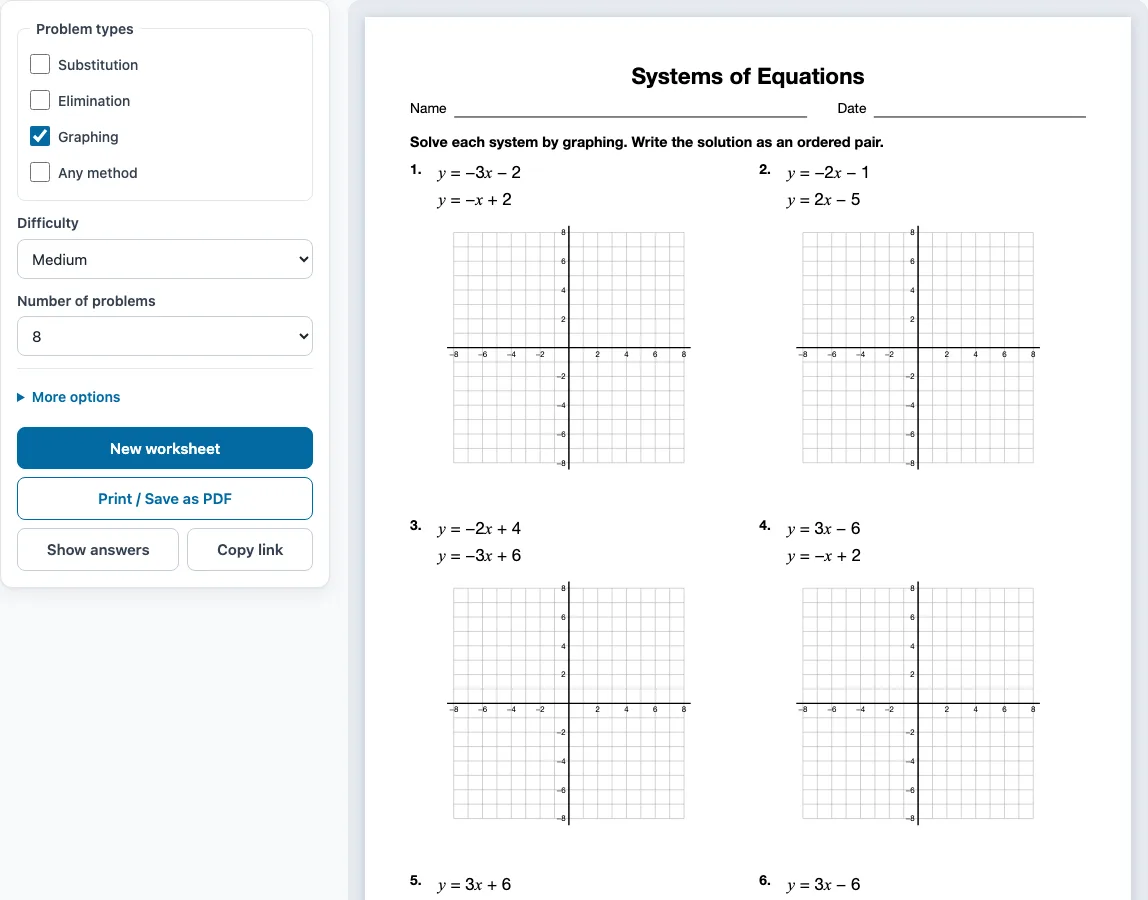
How to use the Systems of Equations Worksheet Generator
- Tick one or more Problem types on the left: Substitution, Elimination, Graphing, or Any method. Graphing is ticked when the page opens.
- Choose a Difficulty: Easy, Medium, or Hard.
- Choose the Number of problems, from 6 to 30.
- Open More options to set the Columns (Automatic, 1, 2, or 3), the Paper size (Letter 8.5 × 11 in or A4 210 × 297 mm), a Worksheet title, and the Name and date line checkbox.
- Keep Answer key on a separate page ticked if you want a key. It is on by default.
- Check the preview on the right. It shows the sheet as it will print.
- Press Show answers to see each answer under its problem in the preview. Press it again to hide them.
- Press Print / Save as PDF. In the print dialog, choose Save as PDF if you want a PDF file.
Press New worksheet to get a fresh random set with the same settings. A teacher can print several versions this way. Copy link saves a link that opens exactly the same worksheet again. Your settings are remembered in this browser for your next visit, unless you open a shared link. The tool also works on phones and tablets, but printing needs a printer or the Save as PDF option.
How do you solve a system of equations by graphing
To solve a system by graphing, draw both lines and find where they cross. The crossing point (x, y) is the only pair of values that makes both equations true.
To graph a line, write it as y = mx + b. Start at b on the y-axis, use the slope m (rise over run) to find a second point, and draw the line through both points. Then read the intersection and check it in both equations.
For example, take y = -3x + 6 and y = -x + 4. The lines cross at (1, 3). Check: -3(1) + 6 = 3, and -(1) + 4 = 3. Both are true, so (1, 3) is the solution.
Graphing problems on this page print an empty grid from -8 to 8 under each system, and every intersection is a whole-number point. Hard problems can use fractional slopes such as y = (1/2)x + 4, so plan your steps carefully. A drawn intersection can be hard to read exactly, so always check the point in both equations.
Substitution vs elimination: which to use
Use substitution when one equation is already solved for y or x, or nearly is. Use elimination when the two equations line up well, so that adding or subtracting them removes one variable. Both methods give the same answer.
With substitution, replace the expression in the second equation. For y = x - 4 and x + y = 8, you get x + (x - 4) = 8, so 2x = 12, x = 6, and y = 2. The solution is (6, 2).
With elimination, add or subtract the equations to cancel a variable. For x + y = 5 and 5x - y = 19, add them to get 6x = 24, so x = 4. Then y = 1, and the solution is (4, 1). If no variable cancels, multiply one equation by a number first.
The Any method type prints systems in standard form, so you can choose substitution or elimination for each one.
Sample problems from this generator
- y = 4x
y = −3x − 7 Answer: (−1, −4) - y = −3x − 2
y = −x + 2 Answer: (−2, 4) - y = 3x + 8
y = −x Answer: (−2, 2) - y = −2x − 4
y = 4x − 4 Answer: (0, −4)
Frequently asked questions
What does it mean if the lines are parallel?
Parallel lines have the same slope and different y-intercepts, so they never cross. The system has no solution. If both equations describe the same line, there are infinitely many solutions. Every system on this worksheet has exactly one solution, so you will not see either case here.
Are answers included?
Yes. The answer key is on by default under More options. When you print, it starts on a new page after the worksheet and lists every problem number with its answer. Graphing answers are drawn as lines with the intersection marked. Press Show answers to see them in the preview first.
Is a simultaneous equation worksheet the same as a systems of equations worksheet?
Yes. Simultaneous equations is the British name for systems of equations. Both mean two equations with two unknowns that are solved together. The same generator makes both.
Can I save a graphing systems of equations worksheet as a PDF?
Yes. Tick Graphing, press Print / Save as PDF, and choose Save as PDF in the browser’s print dialog. You can also change the paper size to Letter or A4 first.
Can I make new problems without changing the settings?
Yes. Press New worksheet to get a fresh random set with the same settings. No problem repeats on a single sheet.
Does it work on a phone?
Yes, it works on phones and tablets. You can still choose problem types, preview the sheet, and copy a link. Printing needs a printer, or you can use Save as PDF.
Can I use the systems of equations worksheets I make in my tutoring business or my TpT store?
Yes. The worksheets and answer keys you generate are free for personal, classroom and commercial use, such as Teachers Pay Teachers products, Etsy listings or a printed workbook. You do not need to credit this site. You may not copy the generator itself and offer it as your own tool.
Related tools
- Slope worksheets: practise finding slope and y-intercept before you graph lines.
- Solving equations worksheets: practise equations with one unknown before moving to two.
- Inequalities worksheets: use these when you need practice with ranges of values rather than single solutions.
- Transformations worksheets: use these to practise moving and reflecting figures on a coordinate grid.
- Quadratic equations worksheets: use these once you are ready for equations with x squared.
- Algebra worksheets: browse the full range of algebra practice on this site.
- Graphing linear equations worksheets: use these to practise graphing single lines before systems.